Web-based user interface for OTP token management
Problem
We need a user-friendly web interface to manage ОТР tokens Self-contained one-time password generator that does not require connection to a computer and installing additional software , that should work with both LDAP and relational storage. A token is a hardware one-time password generator. Usually, it has a display and a button, as shown below:
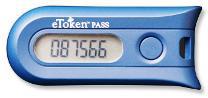
A generated password can be used only once, after that it is invalidated; that's why it can't be used by a malicious third-party if intercepted.
Solution
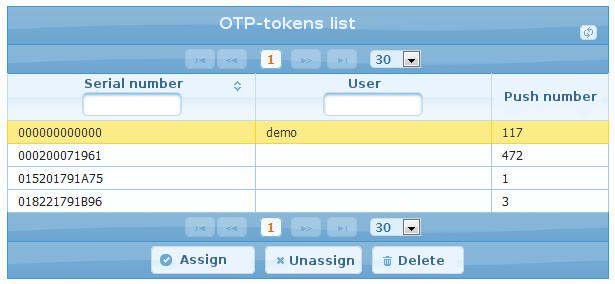
We have created a web interface for token lifecycle management. That means, initial token registration, enrollment, revocation and synchronization. The interface works with both OATH-enabled LDAP (with SLAPI plugin) and Java EE (using JAAS plugin). It is a Java EE application itself, thus, it can be deployed to any Java EE compliant web container. Any major relation databases are supported, in addition to LDAP.
Technologies used:
JSF 2.1
Java™Server Faces (JSF) technology establishes the standard for building server-side user interfaces
,
PrimeFaces 3.2
PrimeFaces is an open source component library for JavaServer Faces, developed by Prime Teknoloji
,
Spring framework 3.1
Spring is the most popular application development framework for enterprise Java™
,
Data Nucleus 3.0
DataNucleus (formerly known as Java Persistent Objects JPOX) is an open source project (under the Apache 2 license) which provides software products around data management in Java
.
Initial registration
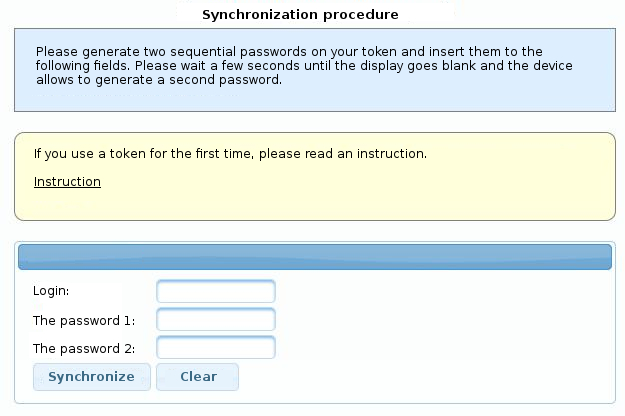
To make token(s) known to the system, one should either import a vendor-supplied XML file, or enter token data manually. This includes seed (secret key) and serial number.
Enrollment and revocation
To assign a token to the user, one must perform an enrollment procedure. The inverse procedure is called revocation.
Any user may have several tokens assigned; at the same time, any token can have only one owner.
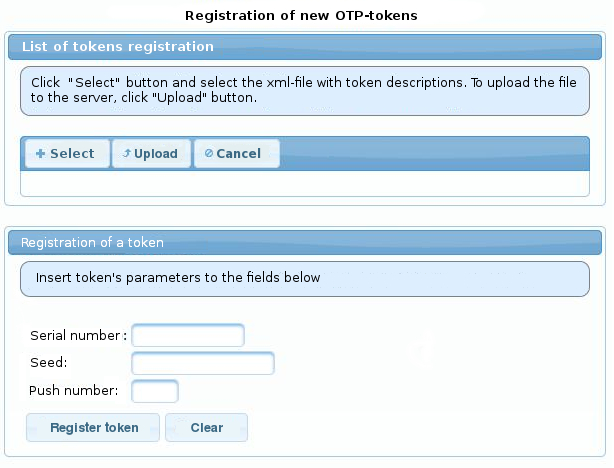
Synchronization If for any reason a token becomes out of sync (for example, the button has been pressed several times unintentionally), synchronization procedure has to be performed. That includes entering login name and two consecutive passwords generated with a token.